SQL Insert – Explanations and examples
This session is all about Insertion. SQL provides INSERT statement which helps to insert one or more records of data into the database table.
Let us consider a default table to understand this concept. Assume the name of the table is “codingeek“.
| Name | Course | Level |
|---|---|---|
| nishi | Java | Beginner |
| faiz | SQL | Intermediate |
| riya | Python | Beginner |
| dishy | C | Advanced |
INSERT INTO statement:
There are two ways of inserting records into the database table.
- If the table structure is known, directly the values can be inserted without mentioning the column names. Note that the order should be maintained as per the example below.
- If the table structure is not known or if you want to insert only into particular columns then give the values along with the column name.
Unable to retrieve the Code part.
Please reload again.
Notify us if the problem still persists.
Till we work on this you can view code on URL below.
Please visit - https://github.com/HiteshGarg/codingeek/blob/master//SQL/Basic/insert-command/insert-types.sql
Query Parameters:
- Table_name: table to which the records are to be inserted.
- column1, column2: the columns in the table to insert values.
- value1, value2: the values assigned to the columns in the table.
Say, column1 is assigned with value1, column2 with value2 and so on.
Example – Insert without column names:
Now you know the structure of the table and you want to insert a row into the “codingeek” table. This can be done as follows,
Unable to retrieve the Code part.
Please reload again.
Notify us if the problem still persists.
Till we work on this you can view code on URL below.
Please visit - https://github.com/HiteshGarg/codingeek/blob/master//SQL/Basic/insert-command/insert-ex2.sql
The above code will insert the values in the following manner which is represented as,
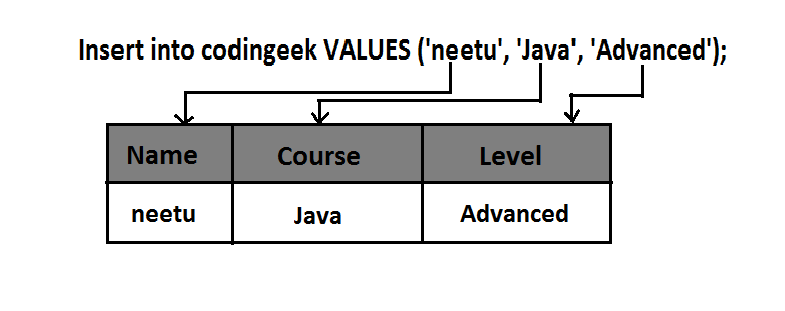
Output:
SELECT * FROM codingeek;
| Name | Course | Level |
|---|---|---|
| nishi | Java | Beginner |
| faiz | SQL | Intermediate |
| riya | Python | Beginner |
| dishy | C | Advanced |
| neetu | Java | Advanced |
Example – Insert with column names:
At times you don’t remember the table structure. In that case, you can insert the column values based on the order you have defined.
Unable to retrieve the Code part.
Please reload again.
Notify us if the problem still persists.
Till we work on this you can view code on URL below.
Please visit - https://github.com/HiteshGarg/codingeek/blob/master//SQL/Basic/insert-command/insert-ex1.sql
Output:
SELECT * FROM codingeek;
| Name | Course | Level |
|---|---|---|
| nishi | Java | Beginner |
| faiz | SQL | Intermediate |
| riya | Python | Beginner |
| dishy | C | Advanced |
| neetu | Java | Advanced |
| sam | DS | Beginner |
Multiple rows can also be inserted which is done as follows:
Unable to retrieve the Code part.
Please reload again.
Notify us if the problem still persists.
Till we work on this you can view code on URL below.
Please visit - https://github.com/HiteshGarg/codingeek/blob/master//SQL/Basic/insert-command/insert-multi.sql
Output:
SELECT * FROM codingeek;
| Name | Course | Level |
|---|---|---|
| nishi | Java | Beginner |
| faiz | SQL | Intermediate |
| riya | Python | Beginner |
| dishy | C | Advanced |
| neetu | Java | Advanced |
| sam | DS | Beginner |
| smita | Python | Advanced |
| neha | C | Intermediate |
Inserting data from another table:
We can insert records from the table to table if necessary. Remember that there should not be any mismatch of data types. The syntax for inserting values from another table is:
Unable to retrieve the Code part.
Please reload again.
Notify us if the problem still persists.
Till we work on this you can view code on URL below.
Please visit - https://github.com/HiteshGarg/codingeek/blob/master//SQL/Basic/insert-command/insert-another.sql
Insert Specific Data from one table to another –
Assume there exist another table in the database called “tutorials”. How to insert data from tutorials to codingeek is seen as follows:
| ID | Student_name | Preferred_subject | Duration |
|---|---|---|---|
| 1 | alia | Java8 | 8 months |
| 2 | shah | C++ | 3 months |
| 3 | elle | Ruby | 6 months |
Unable to retrieve the Code part.
Please reload again.
Notify us if the problem still persists.
Till we work on this you can view code on URL below.
Please visit - https://github.com/HiteshGarg/codingeek/blob/master//SQL/Basic/insert-command/insert-into-select-example.sql
Output:
SELECT * FROM codingeek;
| Name | Course | Level |
|---|---|---|
| nishi | Java | Beginner |
| faiz | SQL | Intermediate |
| riya | Python | Beginner |
| dishy | C | Advanced |
| neetu | Java | Advanced |
| sam | DS | Beginner |
| smita | Python | Advanced |
| neha | C | Intermediate |
| alia | Java8 | NULL |
| shah | C++ | NULL |
| elle | Ruby | NULL |
Note – As you can see, if there are no values to the corresponding column when rows are taken from another table, by default it takes NULL value.
Insert all data from another table:
Consider two tables,
Table – details:
| ID | Name |
|---|---|
| s1 | sarah |
| s2 | komal |
| s3 | sakshi |
| s4 | sona |
Table – info:
| No | Name |
|---|---|
| y1 | anish |
| y2 | arsha |
| y3 | yasmi |
As you can see, both the tables have the same structure. If that is the case, then you can insert one table into another which can be seen as follows:
INSERT INTO details
SELECT * FROM info</pre>
<pre>
Output:
| ID | Name |
|---|---|
| s1 | sarah |
| s2 | komal |
| s3 | sakshi |
| s4 | sona |
| y1 | anish |
| y2 | arsha |
| y3 | yasmi |
The values are inserted from “info” table into “details” table as their structure match with each other. Else it would display with error.
Note – You can use the above query only if the structure of the tables you want to insert data from and to matches. Otherwise the query is invalid.
The capacity to learn is a gift,the ability to learn is a skill, but the willingness to learn is a choice!!
Do share and subscribe and comment below for any suggestion, query or opinion.
Keep Coding! Happy Coding 🙂